
KEYS RESOURCES
NORD LAYOUT


Preset Library
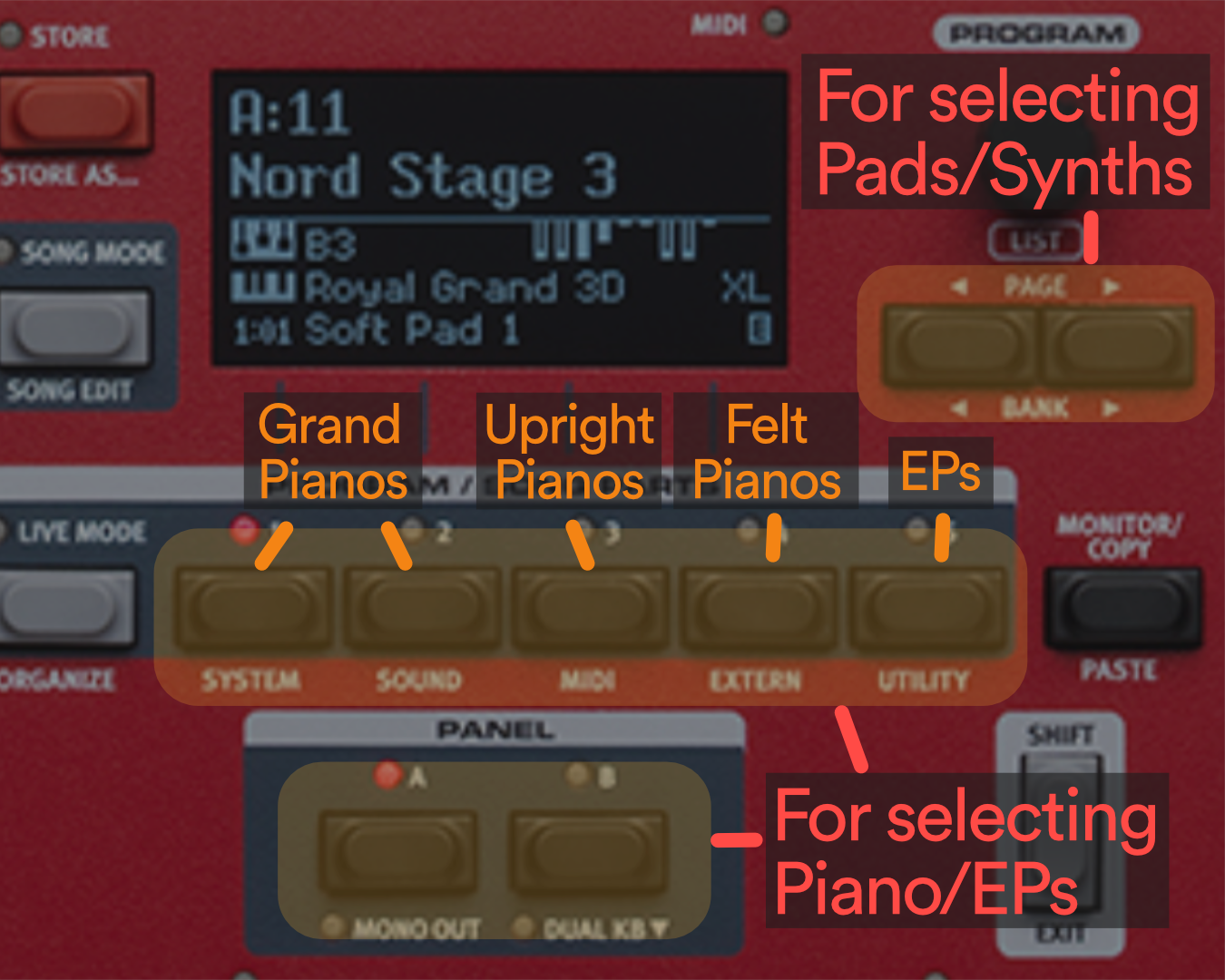
Each Nord preset combines a Pad (the first number) and a Piano/EP (the second number). For example, to pull up the preset with an Altar Call Pad with a Velvet Grand on top of it, you would select preset A:12B. In this example, to get to A:12B, you’d:
Step 1: Scroll to the A:1- presets using the Page/Bank toggles.
Step 2: Select “2” on the programs buttons within that bank and then select the “B” option. By default, the “A” option will pre-select.
Pianos/EPs
(2nd Number)
Pads/Synths
(1st Number)
[-1A] Grand Imperial
[-1B] White Grand
[-2A] Royal Grand 3D
[-2B] Velvet Grand
[-3A] Amber Upright
[-3B] Pearl Upright
[-4A] Felt Upright
[-4B] Felt Upright
[-5A] Rhodes Mk I
[-5B] Wurlitzer
[A:1-] Altar Call Pad
[A:2-] Prophet 5
[A:3-] Juno 60
[A:4-] Smoothie
[A:5-] Cathedral
[B:1-] Analog V Shm
[B:2-] Analog Multi
[B:3-] Chrissy
[B:4-] Cello Flaut
[B:5-] Epic Strings
FAQ
-
For the vast majority of what we do, a great grand piano mixed with a simple pad will work well. Preset A:21A is a great option to start out!
-
All of the pianos are highly usable, it just depends on the context! The beauty of this layout is that it lets you have quick access to the right tool for the right job. Listen carefully to the piano tutorial and see what type of piano they use.
-
Yes! The beauty of newer Nords is even after you switch, the Nord will keep sustaining the old preset and seamlessly bring in the new one when you start playing so there’s no dead space.
-
To ensure everyone has the same experience at campuses and conferences, these initial banks cannot be written over and please do not attempt to. We want every keys player to be able to walk up and know exactly what’s found in every preset!

VIDEO RESOURCES
